
The first ERP with native MES in the furniture industry
Others connect their ERP to an external MES. In MobiTech, the MES is born within the ERP. Every piece has its QR identity from the moment the order is created, and the system generates the manufacturing route — which phase it needs, how long it takes, who processes it — all in real time, all in one application.
It's not an ERP with a connected MES. It's an ERP that thinks about manufacturing from its core.
The industry problem
Furniture factories have been working with fragmented systems that don't communicate with each other for decades.
ERP on one side, shop floor on the other
The ERP manages orders and invoices but doesn't know what's happening in the factory. Production is controlled with Excel, whiteboards or paper.
No real time control
Manufacturing times are estimated, not measured. When a delay arrives, it's already too late to react.
No piece-level traceability
Batches or orders are tracked, but not individual pieces. If a piece has a defect, you can't tell at which phase it occurred.
One system, two worlds connected
MobiTech doesn't integrate a MES into the ERP — it builds it inside. The same application that manages your business controls your factory piece by piece.
Native MES, not integrated
The MES is not an external module or an API. It's born inside the ERP. Data flows without syncs, without duplicates, without delays.
QR identity per piece
Each component receives a unique QR code when the order is generated. From cutting to packaging, every piece is individually traceable.
Real times, not estimates
The system records how long each piece takes at each phase. It's not an estimate — it's the real data from the operator scanning on the floor.
Automatic manufacturing route
The system generates the manufacturing route for each piece based on its characteristics: which phases it needs, in what order, and with what priority.
Scan = Data
Every time an operator scans a QR, the phase, time, operator and any incident is recorded. No paper, no manual entry.
Total visibility
From the office you see the status of every piece, every order, every phase. Bottlenecks appear in real time, not at month end.
From order to delivery, all connected
The MobiTech flow eliminates the gap between management and the factory.
Manufacturing order
The order is created in the ERP. The system breaks down the product into individual pieces and generates a unique QR for each one.
Manufacturing route
The system automatically calculates which phases each piece needs: cutting, edge banding, CNC machining, lacquering, assembly, packaging...
Shop floor production
Operators scan the QR at each phase with the tablet. The system records times, operator, incidents and progress in real time.
Control and delivery
Everything is monitored from the office. When all phases are complete, the piece is marked as ready for dispatch.
Up to 9 configurable phases
Every factory is different. Configure the phases you need: from 2 to 9 production phases adapted to your process.
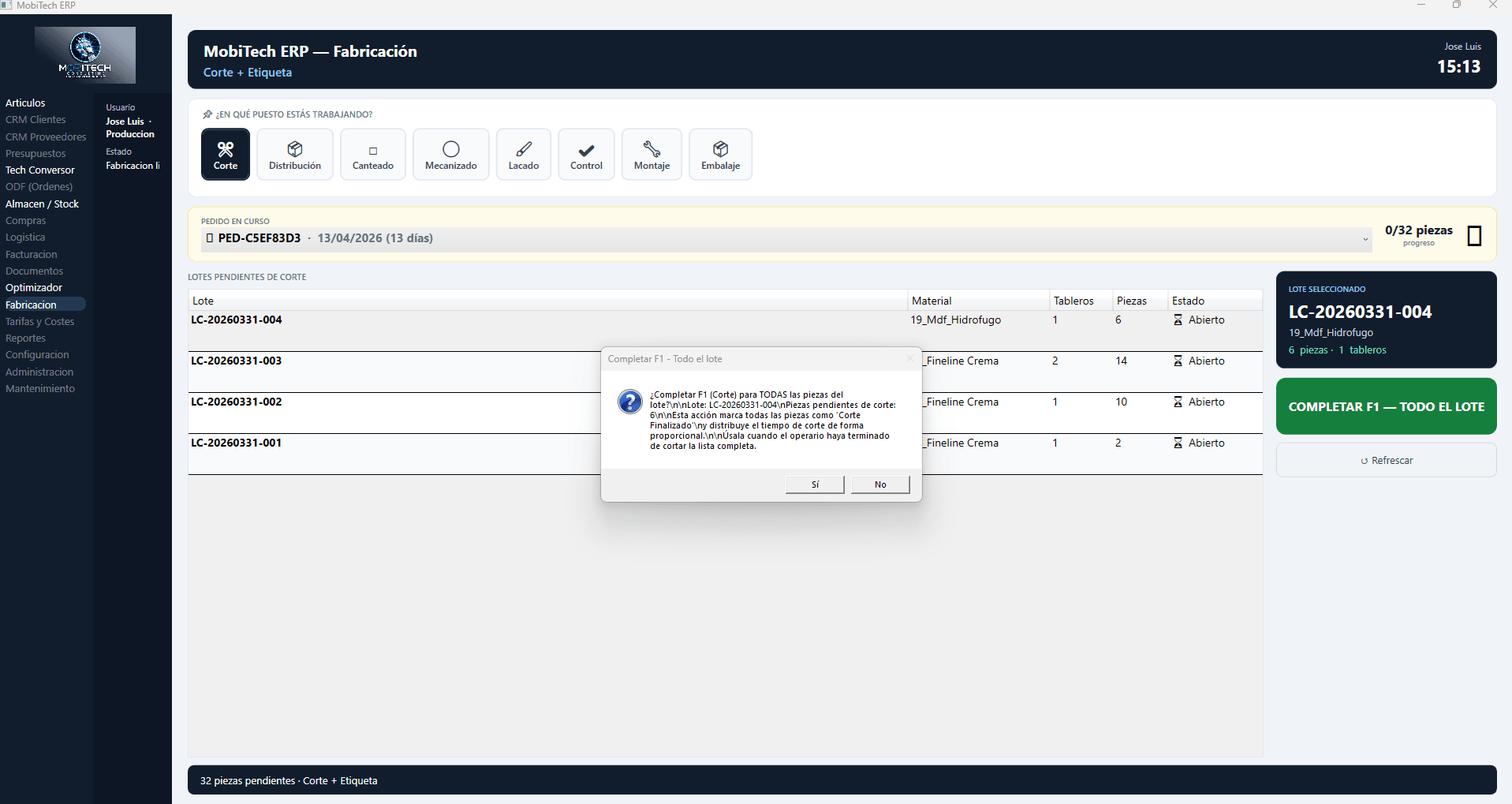
F1 — Cutting
Cutting & QR labeling
The optimizer groups orders with the same material to maximize board yield. The panel saw cuts and each piece comes out already identified with its individual QR label — but all mixed across orders.
Two views, one system
The same information, optimized for each context.
Office View
For supervisors, production managers and executives.
- Real-time production dashboard
- Manufacturing order management
- Performance reports and analytics
- Incident and waste control
Tablet View — Production
For shop floor operators, optimized for industrial use.
- One-touch QR scanning
- Large, clear factory interface
- Instant incident reporting
- Quality checklist per phase
Two tools, total factory control
From the office view you access two complementary tabs: one for global tracking of all orders and another for the detail of each phase piece by piece.
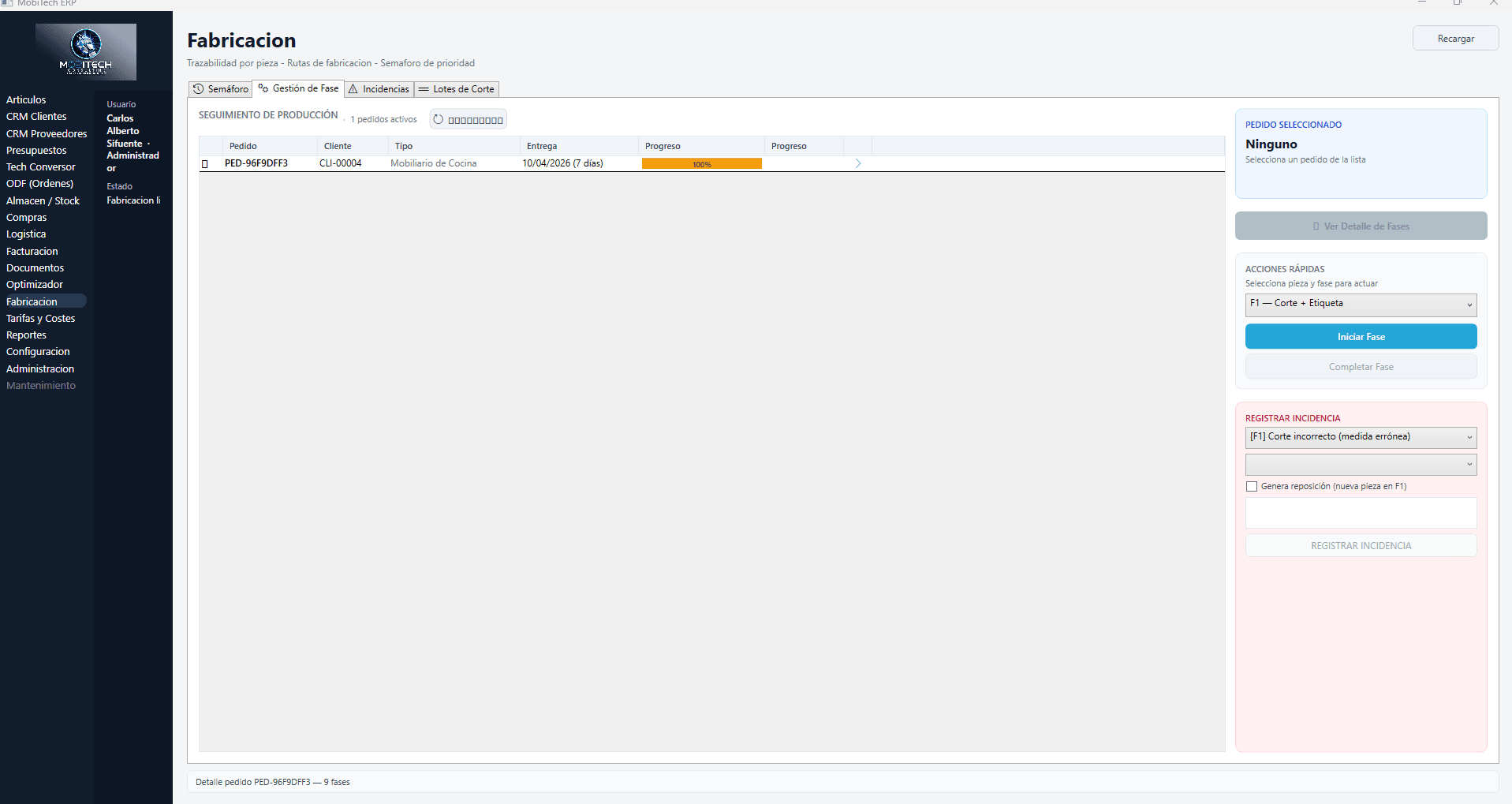
Traffic Light — Order Tracking
The global control view. Shows all active orders with their real-time progress. From here you start and complete phases, register incidents and generate replacements without leaving the screen.
- List of active orders with % progress
- Color bar based on progress state
- Quick actions panel: Start / Complete phase
- Incident registration with automatic replacement
- Configurable auto-refresh (30s / 5min)
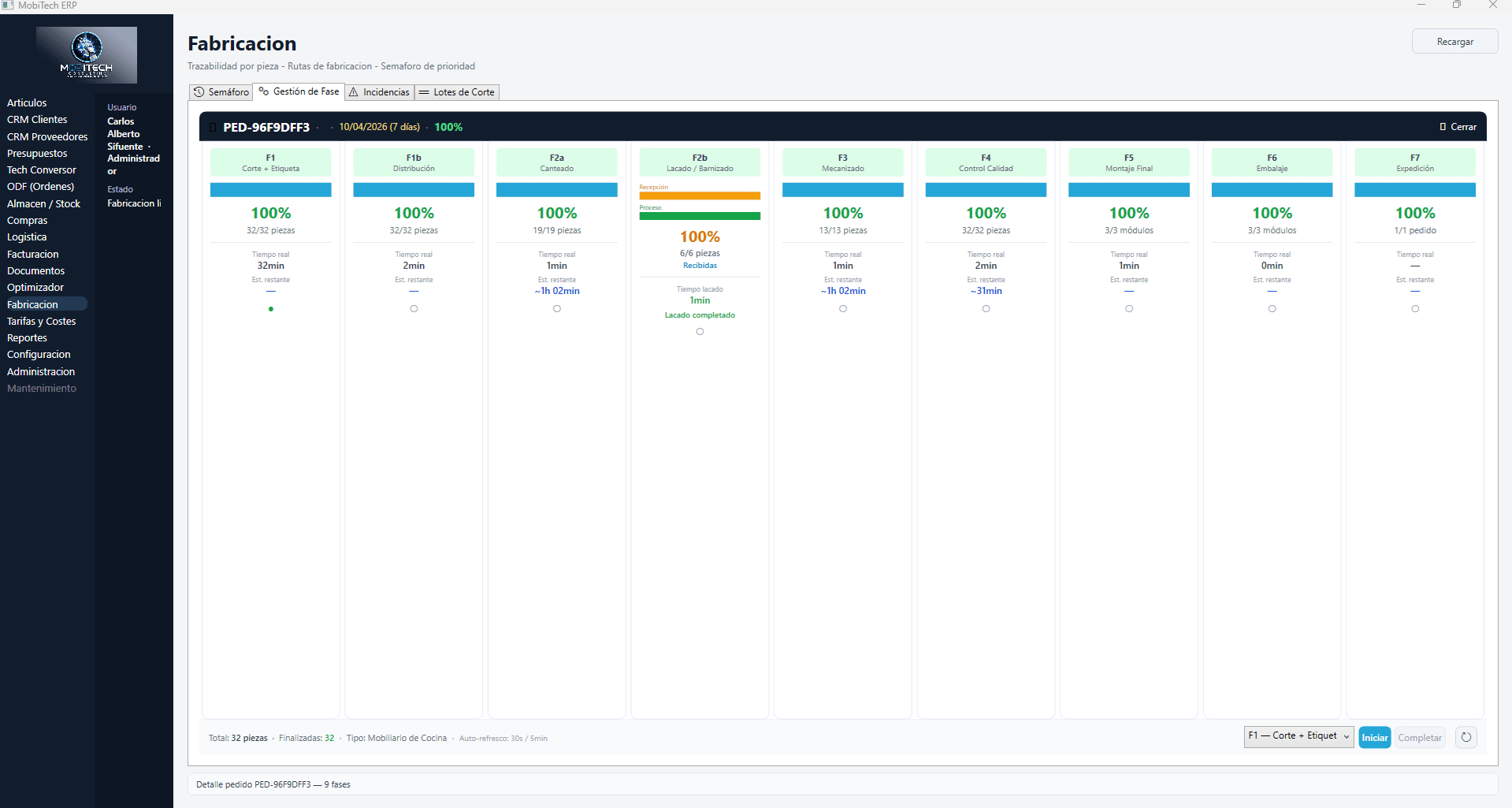
Phase Management — Kanban per Order
The full detail of an order: up to 9 phases displayed as a Kanban board. Each phase shows completed percentage, processed pieces, accumulated real time and estimated remaining time.
- Kanban with up to 9 configurable phases
- Percentage, pieces and real time per phase
- Live estimation of remaining time
- Visual state: reception / process / completed
- Phase selector to operate directly from the office
What our clients achieve
Data based on real implementations in furniture factories.
Individual piece traceability
Papers on the shop floor
Configurable phases per product
Single application for everything
Ready to connect your ERP with your factory?
Request a demo and discover what a truly integrated MES means for your business.